
There are now at least five serious tools for learning languages with Netflix. The problem? Each one’s website will tell you it’s the best. Lingopie publishes articles explaining why Language Reactor isn’t as good. Language Reactor’s marketing implies you don’t need anything else. And everyone buries pricing in fine print.
This guide cuts through the noise. We tested every major tool, checked the actual prices (as of February 2026), and mapped each one to the type of learner it genuinely serves best. Some of these tools work with Netflix. Some are separate platforms entirely—despite what their marketing suggests. We’ll be clear about that too.
If you’re looking for the complete method behind learning with Netflix (subtitle strategy, show selection, daily routine), check out our complete guide to learning a language with Netflix. This article focuses specifically on the tools.
What Netflix already gives you (for free)
Before spending anything on a third-party tool, it’s worth understanding what Netflix offers out of the box—because it’s more than most people realize.
Audio and subtitle languages. Netflix Originals typically offer audio in 5–20+ languages and subtitles in 20–30+ languages. Licensed content varies, but you can usually find at least the original language plus a few major options.
How to get more language options on Netflix: 1. Go to your Netflix profile and change the profile display language to your target language. This unlocks more subtitle and audio options for that language across the catalog, and even the menus become mini lessons. 2. While watching, click the Audio & Subtitles icon. Select “Other” if your target language isn’t immediately visible. 3. Netflix Originals have the widest language selection. If a licensed show only offers 2–3 languages, switch to an Original.
What Netflix doesn’t give you: dual subtitles (two languages at once), a dictionary, word-by-word translations, vocabulary saving, spaced repetition, or any way to adapt the difficulty to your level. That’s where tools come in.
The 5 tools compared
Language Reactor
What it is: A browser extension (Chrome and Firefox) that adds language learning features directly on top of Netflix, YouTube, and Disney+. Formerly known as “Language Learning with Netflix,” it’s the most established tool in this space with over 2 million users.
Price: Free (basic) / $5.95/month / $39.95/year for Pro
What you get for free:
- Dual subtitles (target language + native language displayed simultaneously)
- Basic popup dictionary when you hover over words
- Word and phrase saving within PhrasePump
- Works on Netflix and YouTube
What Pro adds:
- Machine translations (word-for-word breakdowns)
- Speech recognition for any audio track
- Enhanced AI dictionary with deeper explanations
- Export saved words to Anki for spaced repetition
- Support for dubbed content subtitles
Best for: Active studiers who want maximum control. If you like pausing, looking up words, building flashcard decks, and dissecting sentences, Language Reactor gives you the most knobs to turn. It’s the Swiss Army knife approach.
The honest limitation: The interface can feel cluttered—dual subtitles, dictionary panels, sidebar catalogs, all on screen at once. Some learners find this overwhelming rather than helpful. And if you’re the type who wants to watch a show (not study it), all that functionality can work against you by constantly tempting you to pause and look things up.
Lingopie
What it is: A standalone streaming platform with its own library of TV shows and movies, built specifically for language learning. This is not a Netflix extension—it’s a separate service with its own content.
Price: ~€12/month / 7-day free trial / annual and lifetime plans available
What you get:
- 3,000+ shows and movies curated for language learners
- Clickable dual subtitles (tap any word for instant translation)
- Auto-generated flashcards from words you click
- Grammar notes and quizzes built into episodes
- 15 languages supported
- Works on web, mobile app, and smart TV
Best for: Learners who want an all-in-one platform where everything is designed for language acquisition from the ground up. No setup, no extensions, no configuration—just pick a show and start learning.
The honest limitation: You’re not watching Netflix. Lingopie’s catalog is decent but far smaller, and you won’t find the biggest hits (no Lupin, no Squid Game, no Dark). If you’re drawn to specific Netflix content, Lingopie can’t help you with that. It’s also the only tool here that requires its own separate subscription on top of whatever streaming you already pay for.
Common confusion: “Is Lingopie free on Netflix?” comes up constantly in Google searches. The answer is no—Lingopie has nothing to do with Netflix. It’s a completely separate platform. The 7-day free trial lets you test it, but after that, it’s a paid subscription.
FluentU
What it is: A language learning platform built around authentic video content—TV clips, movie trailers, music videos, news segments, and more. Like Lingopie, this is not a Netflix extension. It’s a separate platform with its own curated library.
Price: $29.99/month or $239.99/year / 14-day free trial
What you get:
- Interactive subtitles with word-level translations and grammar explanations
- Personalized quizzes generated from videos you watch
- Spaced-repetition flashcard system
- Speech recognition practice
- Progress tracking and customizable learning paths
- 9 languages: Chinese, English, French, German, Italian, Japanese, Korean, Russian, Spanish
Best for: Structured learners who want lessons built around video content. FluentU feels more like a course than a streaming service—every video comes with exercises, vocabulary lists, and review sessions. If you like having a clear study path, this is the most academic option.
The honest limitation: It’s the most expensive tool on this list by a wide margin. And despite what some comparison articles imply, FluentU does not work with Netflix. “How to use FluentU with Netflix” is a common search query, and the answer is: you can’t. They’re entirely separate platforms. FluentU’s content is also shorter-form (clips and segments, not full series), which means you don’t get the deep immersion of watching a full show.
Sabi
What it is: A Chrome extension that adds language learning features to Netflix, YouTube, Disney+, Prime Video, and Rakuten Viki. Its signature feature is interactive exercises that pop up while you’re watching.
Price: 7-day free trial (no credit card) / €7.99/month / €22.16/year (~€1.84/month)
What you get:
- Dual subtitles (target + native language)
- Hover-over word translations with example sentences and grammar info
- Periodic comprehension exercises during playback (quizzes, fill-in-the-blank)
- Adaptive difficulty that increases based on your performance
- Personalized show recommendations based on learning effectiveness
- 20+ languages supported
Best for: Gamified learners who want to be actively tested while watching. If you find yourself zoning out with passive subtitles and want something that forces you to engage, Sabi’s exercise system keeps you on your toes.
The honest limitation: The exercises interrupt the viewing experience. For some people, this is exactly the push they need. For others, it breaks the flow that makes Netflix effective for language learning in the first place. Whether Sabi works for you depends entirely on whether you prefer “active testing” or “staying in the story.”
Bingy
What it is: A Chrome extension that takes a fundamentally different approach: instead of adding more features to the screen, it adapts what’s already there. After a quick vocabulary assessment, Bingy knows roughly which words you already know—and adjusts subtitles in real time.
Price: 7-day free trial / $9.99/month / $34.99/year ($2.91/month)
What you get:
- Vocabulary level test (~45 seconds) to establish your baseline
- Adaptive subtitles: target language when the subtitle is within your reach, native language when it’s not
- Inline word translation when just one word in a subtitle is blocking comprehension
- Subtitles that evolve as you mark words as known
- Works on Netflix
Best for: Learners who want to stay in the flow of the show without tinkering with settings. Bingy’s approach is “minimum necessary help”—it steps in only when you’re about to lose the thread, and stays invisible when you can handle things yourself. This is the closest thing to having a patient tutor sitting next to you on the couch.
For a deeper look at why this approach works, read our piece on the smart subtitles method.
The honest limitation: If you like manually exploring words, building flashcard decks, or having dual subtitles visible at all times, Bingy won’t satisfy that itch. It’s designed for a different philosophy: less control, more flow. It also currently supports fewer platforms than Language Reactor or Sabi (Netflix only).
Side-by-side comparison
| Language Reactor | Lingopie | FluentU | Sabi | Bingy | |
|---|---|---|---|---|---|
| Type | Extension | Standalone platform | Standalone platform | Extension | Extension |
| Works with Netflix? | Yes | No | No | Yes | Yes |
| Free tier | Yes (basic) | 7-day trial | 14-day trial | 7-day trial | 7-day trial |
| Monthly price | $5.95 | ~€12 | $29.99 | €7.99 | $9.99 |
| Annual price | $39.95 | Varies | $239.99 | €22.16 | $34.99 |
| Dual subtitles | Yes | Yes | Yes | Yes | Adaptive |
| Dictionary/translations | Yes (hover) | Yes (click) | Yes (interactive) | Yes (hover) | Yes (inline, automatic) |
| Exercises/quizzes | PhrasePump | Yes | Yes | Yes (during playback) | No |
| Adapts to your level | No | No | Yes (learning path) | Yes (exercise difficulty) | Yes (subtitle language) |
| Anki export | Yes (Pro) | No | No | No | No |
| Languages | 40+ | 15 | 9 | 20+ | French, Portuguese, English, German |
Prices checked February 2026. May vary by region or promotional offers.
Which one should you pick?
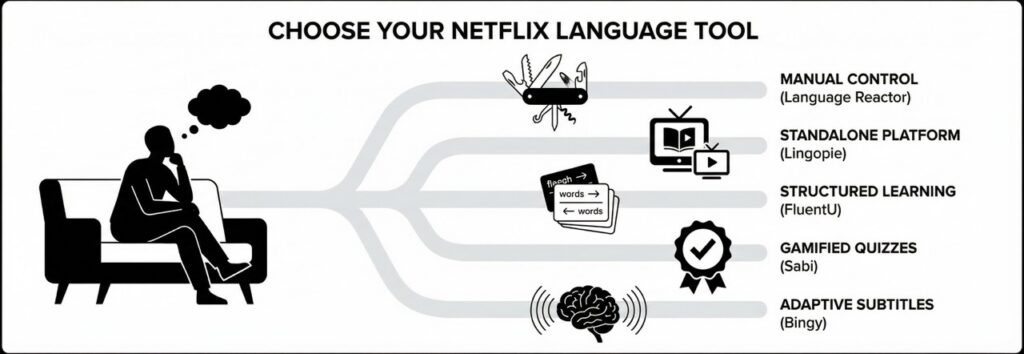
There’s no single “best” tool—it depends on how you learn. Here’s a quick decision guide:
“I want something free that works with Netflix.” Language Reactor’s free tier is the only permanently free option. It gives you dual subtitles and a basic dictionary—enough to get started. Bingy and Sabi both offer 7-day free trials if you want to test their approaches first.
“I want to study actively while watching—pausing, looking up words, building flashcards.” Language Reactor Pro. It’s built for exactly this workflow, with the most manual control of any tool on the list.
“I want subtitles that adapt to my level so I can just watch.” Bingy. Its entire design philosophy is keeping you in the story while your brain absorbs language in the background. No buttons to click, no settings to adjust—it figures out what you need.
“I want to be tested while I watch—quizzes, exercises, active recall.” Sabi. Its periodic exercises during playback are unique among Netflix extensions and keep you actively engaged rather than passively watching.
“I don’t care about Netflix specifically—I want a dedicated learning platform.” Lingopie if you want TV shows and movies with built-in learning tools. FluentU if you prefer shorter video clips with a more structured, course-like approach. Both are good; FluentU is significantly more expensive.
“I want the cheapest annual plan.” Sabi at €22.16/year, followed by Bingy at $34.99/year, then Language Reactor at $39.95/year. All three are under $4/month on annual plans.
FAQ
Does Netflix have language learning features? Not built-in. Netflix offers audio and subtitles in many languages, which is a great starting point. But for features like dual subtitles, dictionaries, vocabulary saving, or adaptive difficulty, you need a third-party tool.
What is Language Reactor on Netflix? Language Reactor is a free Chrome extension (formerly called “Language Learning with Netflix”) that adds dual subtitles and a popup dictionary to Netflix and YouTube. The basic version is free; Pro costs $5.95/month or $39.95/year.
Is Lingopie free on Netflix? No. Lingopie is not connected to Netflix at all—it’s a separate streaming platform with its own content library. It offers a 7-day free trial, after which it’s a paid subscription (~€12/month).
How much is the Language Reactor subscription? The basic version is free. Pro costs $5.95/month, $13.95 for 3 months, or $39.95/year. Pro adds machine translations, speech recognition, enhanced AI dictionary, and Anki export.
How does FluentU work with Netflix? It doesn’t. Despite frequent searches asking this question, FluentU is a completely separate platform with its own video library. It does not integrate with Netflix in any way. FluentU costs $29.99/month or $239.99/year.
Is there a 100% free language learning app for Netflix? Language Reactor’s free tier is the only permanently free option that works with Netflix. It provides dual subtitles and a basic dictionary. Bingy, Sabi, and Lingopie all offer free trials (7–14 days) but require a subscription after that.
How to get more language options on Netflix? Change your Netflix profile language to your target language in your account settings. This unlocks more audio and subtitle options across the catalog. Netflix Originals always have the widest language selection—if a licensed show is missing your target language, try an Original instead.
The bottom line
Every tool on this list can help you learn a language with Netflix (or video content in general). The difference is in how they help:
- Language Reactor gives you the most control and the most features, for free or cheap.
- Lingopie and FluentU replace Netflix entirely with their own curated libraries.
- Sabi keeps you actively engaged with exercises during playback.
- Bingy keeps you in the flow by adapting subtitles to your vocabulary level automatically.
The best tool is the one that matches your learning style—because the tool you actually use consistently will always beat the “better” tool gathering dust in your Chrome extensions.
If you want to try Bingy’s adaptive approach, take the free vocabulary test to get started—it takes about 45 seconds, and it sets up your personalized subtitles automatically. For recommendations on what to watch, check out our guide to the best French shows on Netflix.
Leave a Reply